


Live Digital Caricatures in Cambridge - A Microsoft Surface Sketching Adventure

A live caricature session has a special kind of electricity. Someone sits down a little unsure, their friends gather round, the first bold line appears on the screen, and then the laughter starts.
That was the mood at a recent corporate event in Cambridge, where I set up with my Microsoft Surface tablet, stylus, stand, and a queue of curious faces ready to be turned into quick digital sketches. The room had that end-of-event buzz: people chatting over drinks, colleagues catching up away from their usual roles, and plenty of “Go on, you have to get one” encouragement from the sidelines.
Live digital caricature is part drawing, part performance, and part friendly conversation. The sketch matters, of course, but the experience around it matters just as much. Each portrait became a tiny event of its own, with people guessing which feature would be exaggerated next, comparing finished sketches, and laughing at the details they recognised straight away.
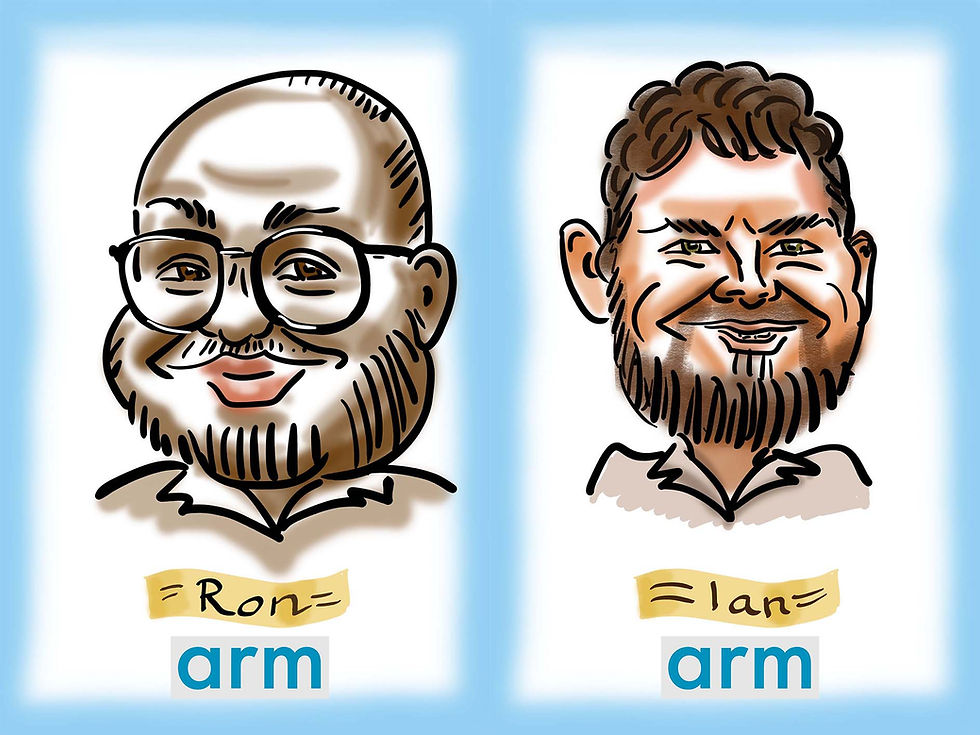
The fun of drawing faces live
Live caricature has a rhythm I never get tired of. A guest sits down, I ask a quick question or two, and then the drawing begins. There is no long warm-up. No hiding behind a studio door. The sketch develops in front of the person being drawn, and that makes every line feel more alive.
At an event like this, the first few seconds matter. People often arrive with a mix of excitement and nervousness. They might say, “Be kind,” or “Please don’t make my nose huge,” while their friends immediately request the opposite. That back-and-forth is part of the fun.
A quick caricature is not about being cruel. The best ones feel affectionate. They pick up on something true, then turn the volume up just enough to make it funny.
That might be:
A big grin that arrives before the person says a word
A strong pair of eyebrows doing half the talking
A distinctive hairstyle with real character
A pair of glasses that frames the whole face
A relaxed pose that says more than a formal smile ever could
The Cambridge crowd brought plenty of personality. Some people sat still and watched every stroke. Others chatted all the way through and only looked at the end. A few tried to keep a straight face while colleagues offered “helpful” suggestions from behind me.
The best moments came when the drawing suddenly clicked. There is usually a point halfway through where a friend says, “That is absolutely you,” and the sitter leans in to see what everyone else has spotted. That moment is why live caricature works so well at events. It creates a shared joke, but a warm one.
Why digital caricatures work so well at events
Traditional pen-and-paper caricatures still have charm, but digital drawing brings a different kind of energy. The screen is bright, the colours pop, and people can watch the sketch build in a way that feels fresh and immediate.
At a busy event, digital art also keeps things neat. No piles of paper sliding around. No ink smudges. No panic when someone puts a drink too close to the artwork. The setup is compact, quick to manage, and easy for guests to gather around.
Digital caricatures also suit the way people enjoy event entertainment now. Guests want something personal, quick, shareable, and memorable. A good caricature gives them all four.
It is personal because the drawing is made for one person in the moment. It is quick because each sketch can be completed while the energy is still high. It is shareable because the finished artwork can be saved or displayed digitally. It is memorable because people associate the image with the laughter around it.
At this Cambridge event, the tablet became a magnet. People wandered over to watch even when they were not yet ready to sit. Some studied the brush strokes. Some asked about the app. Some wanted to know how long each one took. Others simply enjoyed seeing familiar faces appear in cartoon form.
That mix of art, tech, and conversation is exactly why live digital caricatures are such a strong fit for modern event entertainment.
The Microsoft Surface setup
For this event, my main tool was a Microsoft Surface tablet paired with a pressure-sensitive stylus. It is a lovely setup for live caricature because it keeps the drawing process quick, light, and flexible.
The Surface gives me a bright screen, enough space to draw comfortably, and the freedom to work without a bulky kit. I can zoom in for detail, zoom out to check the likeness, and use layers to keep the sketch clean without slowing the pace.
My live setup tends to focus on speed and clarity. Guests are not sitting for a full studio portrait. They want the fun of seeing themselves transformed in minutes. That means the tools need to support fast decisions.
A typical digital caricature setup includes:
A pressure-sensitive stylus
This helps create thick and thin lines naturally, much like a real pen or brush.
A clean base brush
I use a reliable line brush that responds well to quick movements and expressive curves.
Simple colour layers
Colour adds warmth and personality, but it needs to stay efficient during a live event.
A portable stand
The tablet has to be at a comfortable drawing angle while still allowing guests to see the process.
A tidy file workflow
Digital art grows quickly, so naming, saving, and organising sketches matters more than people think.
The magic is not in having endless digital options. In fact, too many options can slow things down. Live drawing works best with a small set of trusted tools. I want the interface to disappear, so I can focus on the person in front of me.


Comments